
How to Convert USDT to INR in india
If you are a trader, or you work with a foreign company, or maybe you receive your salary in crypto, or you are planning to enter the crypto space but don’t know how to convert USDT into INR, then this article is for you. Many people in India are earning in USDT today, but the most common question they have is how to convert USDT into Indian Rupees safely and legally.
In this article, I will explain the complete process in a very simple and practical way.
Mainly, there are two reliable methods to convert USDT into INR in India, and I will explain both of them step by step. Once you understand these methods, you can choose the one that fits your needs, whether you are a beginner, a trader, or someone receiving crypto payments from abroad.
Method 1: How to Convert USDT to INR Using CoinDCX in India
For Indian users, my first preference to convert USDT into INR is CoinDCX. It is one of India’s largest crypto exchanges, with over 10 million downloads, a Crypto Investor Protection Fund of more than ₹55 crore, and it is also a FIU-registered crypto exchange, which adds an extra layer of trust and compliance. Because of these reasons, CoinDCX is a reliable option for beginners as well as experienced traders.
Another important factor is pricing. When you check the USDT to INR rate on CoinDCX, it is usually very competitive compared to many other exchanges. For example, as of today, the USDT to INR price is around ₹99.97, which means for every 1 USDT you sell, you receive approximately ₹99.97 in INR. This makes it a good choice for converting USDT without losing much value on price differences.
Step-by-Step Process to Convert USDT to INR on CoinDCX:
- First, make sure you have already created your CoinDCX account and linked your bank account successfully.
- Log in to your CoinDCX app or website and go to the Portfolio section.
- Under the Coins tab, check your available USDT balance.
- Next, open the Market section and search for USDT.
- Select USDT/INR under the Spot market.
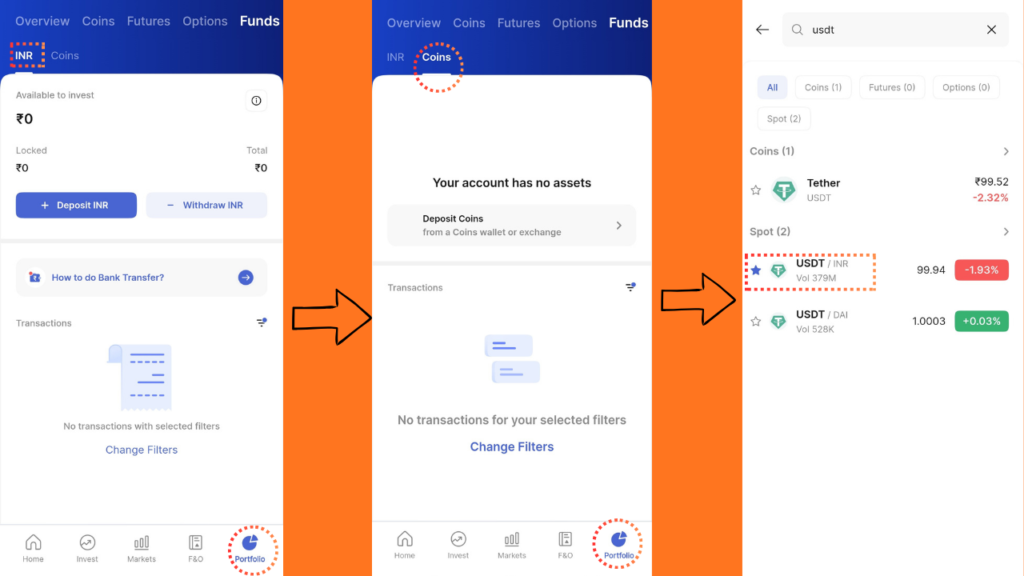
- Click on the Sell option to start the conversion process.
- Always choose Limit Order so you can decide the price at which you want to sell your USDT.
- Enter the price at which you want to sell and then enter the quantity of USDT. You can also quickly select the quantity using 25%, 50%, or 100% of your total USDT balance.
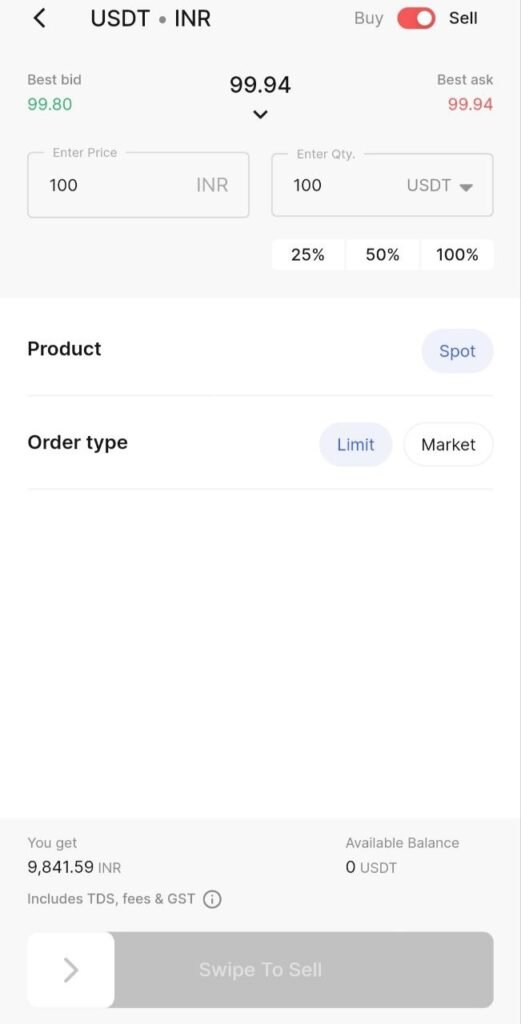
- Tap on the information (i) icon to check details related to GST and TDS before placing the order.
- Swipe to sell and your order will be placed successfully.
- To track your order, go to Home → More → Orders.
- Check Pending for open orders. Check History for completed orders.
Once your USDT is sold, the INR amount will appear in your Portfolio under the INR section. Finally, click on Withdraw INR and transfer the money directly to your linked bank account.
Method 2: Converting USDT to INR Using P2P (Peer-to-Peer)
Now let’s talk about the second method. Honestly, this is not my favorite option, and I generally do not recommend it unless you clearly understand the risks involved. In P2P transactions, you do not always know who you are dealing with. You don’t know who is buying your USDT, where their INR is coming from, or what kind of background they have. If the buyer is involved in illegal activities such as fraud or money laundering, you may also come under trouble, even if you were not directly involved. That is why, for safety and peace of mind, I personally suggest avoiding this method.
However, if you still want to use P2P, I’ll explain the process so you know exactly how it works. I am assuming that you already have an account on Binance, which is one of the most trusted and widely used platforms for P2P trading.
Step-by-Step Process (Binance P2P)
- Log in to your Binance account.
- Go to the Assets section and check your USDT balance under Spot or Funding.
- Now, go to the Trade section and select P2P.
- You will see two options:
- Buy (to buy USDT)
- Sell (to sell USDT)
Choose Sell if you want to convert USDT into INR.
- In the Sell section, you will see a list of buyers who want to purchase USDT.
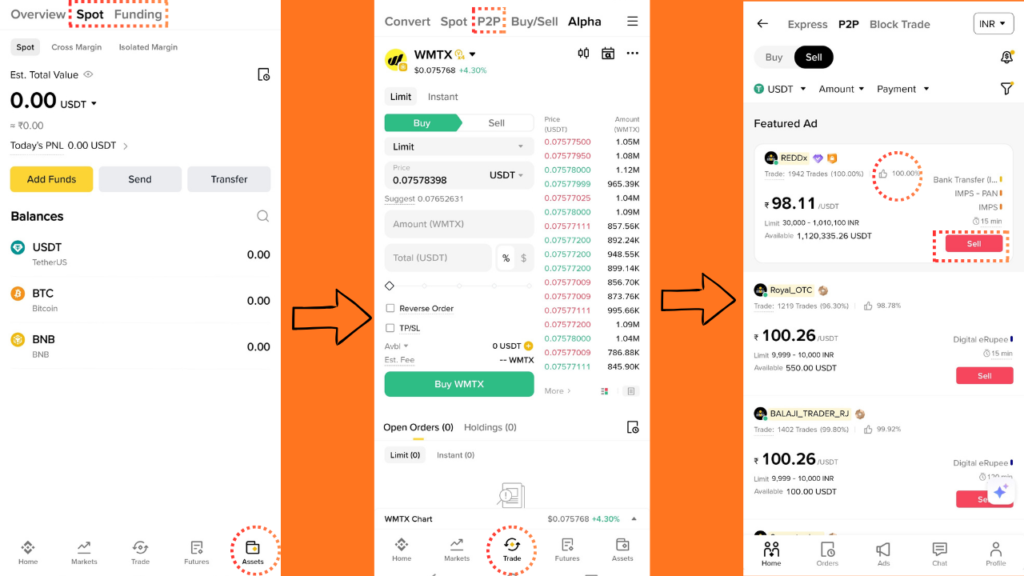
- Choose a buyer carefully.
Always select a buyer with:- 90% or higher completion rating
- 1,000+ completed trades
This reduces the chances of scams or delays.
- You can also use the Filter option to select how much USDT you want to sell.
- Once you select a suitable buyer, click on Sell.
- Enter the amount of USDT you want to sell and place the order.
- After placing the order, you can chat directly with the buyer through Binance’s chat system.
- The buyer will transfer INR to your linked bank account.
- Once you receive and confirm the INR in your bank account, only then release your USDT to the buyer.
This is the basic process of converting USDT to INR using P2P.
But one very important thing to remember is that P2P transactions must be properly reported as per Indian government and income tax rules. Reporting these transactions helps you avoid penalties and ensures transparency in case of future queries from banks or tax authorities.
Because of the risks involved, P2P should be used only when necessary and with full caution.
This article is for educational and informational purposes only and does not constitute financial, investment, or legal advice. Crypto rules, prices, and tax laws may change, so always verify with official sources and consult a professional before making any decisions.
Read More:



11 Comments